Attach a file to a transaction
Attaching a file from your library, what stays where afterwards, and what the Shared switch on one attachment actually gives away.
Attach a file
Open the transaction and go to the Attachments card at the foot of its page. The same card sits in the preview panel a row click opens in the transaction list, so a quick attachment needs no page of its own.
- Choose Add file.
- Upload new takes a file off your computer. From library picks one you have already uploaded, searchable by name and with anything already on this transaction left out.
- Leave the Share with budget members checkbox clear to attach the file privately.
- Press Attach.
The file stays in your library
Attaching links a file to a transaction rather than moving it. It stays in Files, and one file can be linked to several transactions at once, which is what a receipt covering two separate payments needs.
The file's own page in the library lists the transactions it is attached to, so you can travel in either direction.
Removing an attachment asks first and removes only the link. Deleting the file in the library is the other action, and it clears every transaction it was on.
Shared or private, one file at a time
Each attached file carries its own switch reading Shared or Private. Sharing is set per attachment and not per transaction, so a receipt can be shared while the statement sitting directly beneath it stays private.
Anything you attach yourself starts private unless you ticked the box in the attach dialog. Private means you are the only person who can list that file or download it.
Only the transaction's owner sees the switch. Everyone else is sent the shared rows and nothing more, so there is no state for them to change, and what reaches them is the file itself rather than the notes or extracted text you keep alongside it.
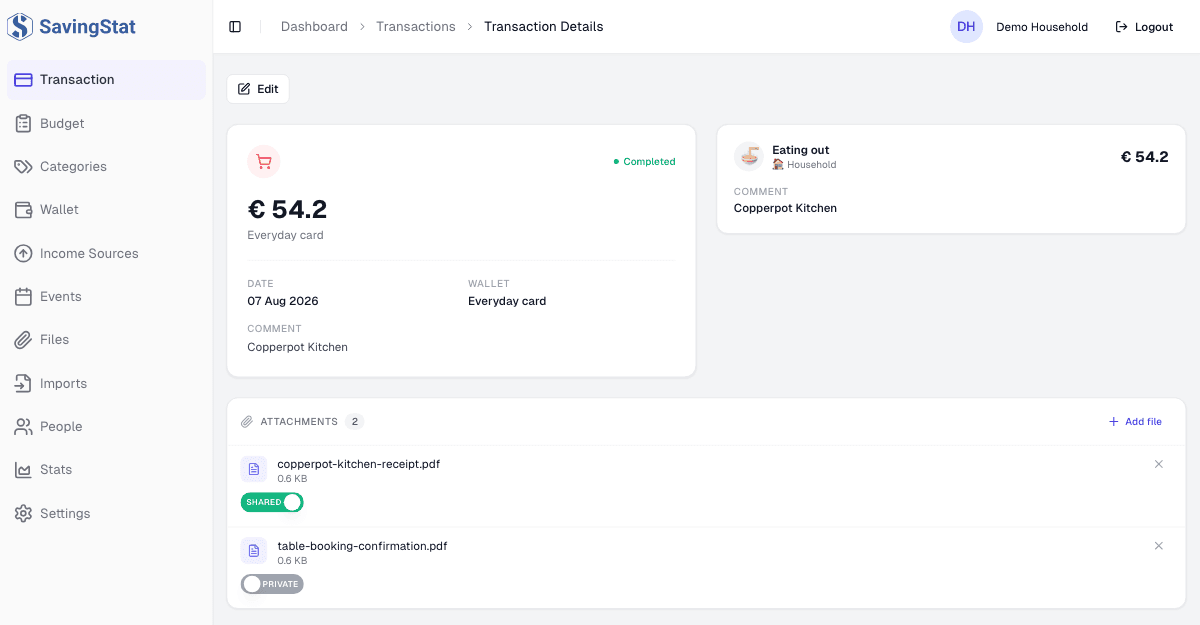
Who a shared file reaches
Shared offers that one file to the accepted members of the budget the transaction is filed under. They can list it and download it. The transaction is not shared by it, and neither are the other files on it.
The budget in that sentence is the one recorded on the transaction record itself, and only an import ever writes it. A transaction you entered by hand keeps its budgets on its expense lines, and the sharing check does not read those.
So on a row you typed in, the switch moves and the setting saves, and it reaches nobody: the record names no budget, so there is no membership to test it against. Treat it there as a note to yourself. Transactions explains where a budget sits on each kind of record.
What an import attaches
An import attaches its own source file to every transaction it creates, so the statement or photograph a row was read out of stays reachable from that row.
It also chooses the sharing, by kind. A receipt scan arrives Shared: the picture is of that one purchase. A statement arrives Private, because it carries every other row in the file as well. Either can be changed afterwards, under the same rule as above.